
Your Amrod catalogue.
On your own website.
CatalogueConnect builds websites for Amrod resellers.
We connect the site to your own Amrod account, load the catalogue, apply your pricing rules and keep product, price and stock data updated. Your customers browse under your company name, on your domain, and send you a complete quote request with the colours, sizes and quantities already filled in.
Website build: R18 999 once off.
See an example website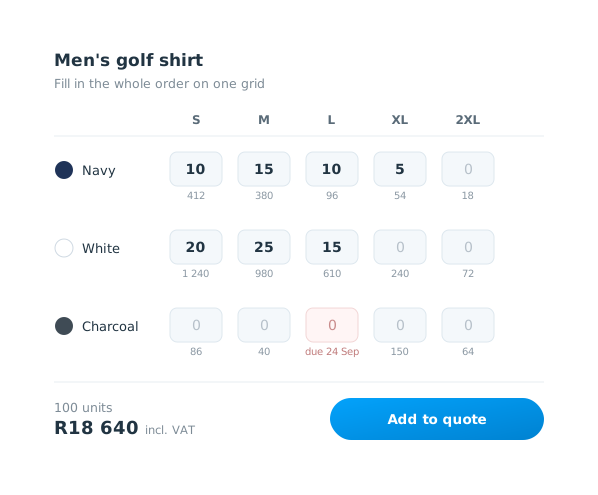
What we build
This is not a link to a supplier catalogue and it is not a handful of products loaded into a normal brochure website.
The website uses the catalogue available to your own Amrod reseller account. Products, variations, images, prices and stock are pulled into a WooCommerce website that carries your branding and your contact details.
You decide which parts of the range you want to sell. If you want the full catalogue, we publish the full catalogue returned by your account. If you only work with selected categories or brands, the site can be limited to those.
Your selling prices are based on your own Amrod cost
Amrod pricing is account-specific. The site reads the cost available to your account and applies the markup rules you set.
You can use a default markup across the range, then set different rules for particular brands or categories. Volume pricing can reduce the markup at higher quantities, with a minimum floor so a large order never drops below the margin you are prepared to accept.
Customers see your selling price. They do not see your Amrod cost or your markup percentage.
Customers can enter the whole size and colour split
A bulk clothing order is rarely “100 medium navy shirts”. It is usually several colours spread across several sizes.
The product page uses one quantity grid with colours down the side and sizes across the top. The customer enters the quantities they need in the relevant boxes and can see the available stock while doing it.
Instead of receiving this:
“Please quote me on 100 golf shirts. Mostly navy. Mixed sizes.”
You receive the colour, size and quantity breakdown together.
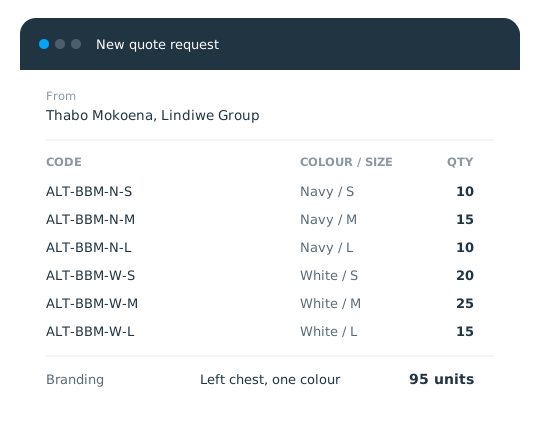
The quote request arrives with the product codes attached
The customer can add several products to one quote basket and submit them together.
When the request reaches you, it includes the selected variations, quantities and supplier codes. The website recalculates the selling prices on the server before storing and emailing the request.
You still handle the parts that need human judgement, such as branding method, artwork, unusual deadlines, delivery and any job-specific costs.
Stock and catalogue changes do not need to be maintained by hand
The catalogue sync checks for new and discontinued products, pricing changes and stock movement.
A full catalogue refresh runs overnight. Stock is refreshed during the day, with changes checked every fifteen minutes.
If a scheduled sync fails, it is monitored rather than waiting for a customer to discover that something is stale.
It runs under your name and your domain
The website uses your:
- Company name and logo
- Colours and contact details
- Domain name
- Selling prices
- Trading terms
- Product and category content
The site is built on WooCommerce, so normal page and product content can be edited from the admin area.
Search engines index your domain, not a supplier-hosted page carrying somebody else’s brand.
What the R18 999 build includes
Hosting, domain registration and email are quoted separately so the build cost and the ongoing running cost are clear before you proceed.
How long does it take?
Most builds take two to three weeks once we have your company details and working Amrod API access.
We need your logo, company information, Amrod account details, starting markup, trading terms and preferred domain. We test the catalogue connection first, then build the website around live data from your account.
Website build: R18 999 once off
There is one build package rather than several feature tiers.
R18 999 once off covers the website and integration described above.
Hosting, domain registration and mailboxes are quoted separately.